
網卡設定
 Tags Tags | |
|---|---|
 開串 開串 |  Meteoroid Meteoroid |
 Created Created | |
| 最後編輯時間 | |
| 最後編輯者 |  陳柏丞 資訊112甲 陳柏丞 資訊112甲 |
在設定網卡之前,你可能需要先更改網卡名稱,參考「 💳修改網卡名 」
開始設定
網卡的設定檔位置在 /etc/network/interfaces,使用 vim 編輯
設定網卡的細項
# vim /etc/network/interfaces讓網卡在開機時啟動
auto 網卡名稱你會遇到幾種類型的:
- DHCP
iface 網卡名稱 inet dhcp- 固定 IP
iface 網卡名稱 inet static
	address IP位址
	netmask 遮罩 (可以輸入長度或是點分十進制)
	gateway 閘道位址
dns-nameservers DNS位址1 DNS位址2 DNS位址3- PPPoE
在這一種類型當中,要先安裝
pppoeconf# apt-get install pppoeconf
範例
假設你要為電腦設定:
- 已知網卡名稱為
eth0
- 靜態 IP 是
12.34.56.78,遮罩255.255.255.0
- DNS 伺服器是
8.8.8.8和1.1.1.1
- 預設閘道是
12.34.56.254
auto eth0
iface eth0 inet static
	address 12.34.56.78
	netmask 255.255.255.0 #或 24
	gateway 12.34.56.254
	dns-nameservers 8.8.8.8 1.1.1.1
完成設定
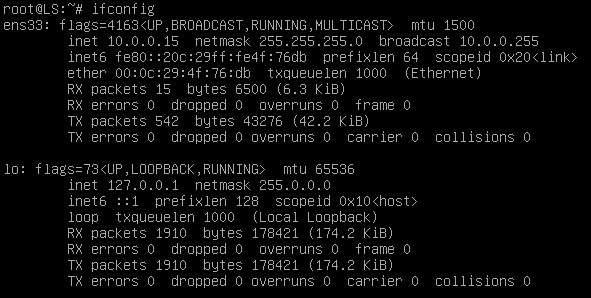
# systemctl restart networking如果你要檢查設定值的話,請使用
# ifconfig會有類似下圖的輸出: